
Scaling Gluetun: Running Multiple VPN Instances with HAProxy

I mean, it’s 2025, and with media streaming services being more expensive and worse than ever, sailing the forbidden seas isn’t exactly new to most people. So whenever you're using Gluetun, the “lightweight Swiss army knife like VPN client for multiple VPN service providers,” for legitimate purposes or for your Servarr stack, you may have run into the same problem I have: running a multi VPN Gluetun setup because of low quality VPN service providers or rate limits.
For my purposes, I wanted a three-VPN setup that does not stack on top of each other but distributes the traffic among them, with the ability to fall back to one of the other providers if a request fails with the previous one. For that, I settled on a combination of Docker Compose, Gluetun, and HAProxy. The main caveat at this point is that HAProxy is only meant for HTTP and TCP traffic, so to comply with that, we need to enable the HTTPPROXY feature for each Gluetun instance.
So without much hastle, this is my current docker-compose.yml file:
x-gluetun-base: &gluetun_base
  image: qmcgaw/gluetun:latest
  cap_add:
    - NET_ADMIN
  devices:
    - /dev/net/tun:/dev/net/tun
  restart: unless-stopped
  networks:
    - Blockbuster_network
  healthcheck:
    test: ["CMD", "/gluetun-entrypoint", "healthcheck"]
    interval: 10s
    timeout: 5s
    retries: 3
    start_period: 15s

services:
  haproxy:
    image: haproxy:alpine
    container_name: haproxy
    ports:
      - 8887:8887
    volumes:
      - ./haproxy/haproxy.cfg:/usr/local/etc/haproxy/haproxy.cfg:ro
    restart: unless-stopped
    networks:
      - Blockbuster_network

  gluetun_PerfectPrivacy:
    <<: *gluetun_base
    container_name: gluetun_PerfectPrivacy
    environment:
      - TZ=${TZ}
      - HTTPPROXY=on
      - HTTPPROXY_LOG=on
      - BLOCK_MALICIOUS=off

      - VPN_SERVICE_PROVIDER="perfect privacy"
      - OPENVPN_USER=${PerfectPrivacy_USER}
      - OPENVPN_PASSWORD=${PerfectPrivacy_PASSWORD}
      - UPDATER_PERIOD=24h

  gluetun_RapidSeedbox:
    <<: *gluetun_base
    container_name: gluetun_RapidSeedbox
    environment:
      - TZ=${TZ}
      - HTTPPROXY=on
      - HTTPPROXY_LOG=on
      - BLOCK_MALICIOUS=off

      - VPN_SERVICE_PROVIDER=custom
      - VPN_TYPE=wireguard
    volumes:
      - ./RapidSeedbox/wg0.conf:/gluetun/wireguard/wg0.conf:ro

  gluetun_ProtonVPN:
    <<: *gluetun_base
    container_name: gluetun_ProtonVPN
    environment:
      - TZ=${TZ}
      - HTTPPROXY=on
      - HTTPPROXY_LOG=on
      - BLOCK_MALICIOUS=off

      - VPN_SERVICE_PROVIDER=protonvpn
      - VPN_TYPE=wireguard
      - WIREGUARD_PRIVATE_KEY=${ProtonVPN_PRIVATE_KEY}
      - FREE_ONLY=on

networks:
  Blockbuster_network:
    external: true
At the top, I define an extension block called x-gluetun-base. This works like a reusable template. All my Gluetun containers inherit this base configuration so I don’t have to repeat the same settings three times. It includes the Gluetun image, NET_ADMIN capability, the TUN device, a shared network, a healthcheck, and a restart policy.
Each of the three VPN containers then extends this base config using <<: *gluetun_base and only overrides what’s specific to that provider.
The services:
-
haproxy:
This is the load balancer sitting in front of all Gluetun instances. It exposes ports 8887 (for proxying traffic). It mounts a localhaproxy.cfgfile where all the balancing logic lives. HAProxy joins the same Docker network so it can reach all the Gluetun containers directly. -
gluetun_PerfectPrivacy:
A Gluetun container configured for Perfect Privacy. Here I enable the HTTP proxy feature (required since HAProxy only supports HTTP and TCP) and pass the provider login credentials from environment variables. It updates once every 24 hours. -
gluetun_RapidSeedbox:
This one uses a custom WireGuard configuration instead of a built-in provider. The only difference is theVPN_SERVICE_PROVIDER=custom,VPN_TYPE=wireguard, and the mountedwg0.conffile containing the WireGuard settings. -
gluetun_ProtonVPN:
A WireGuard-based ProtonVPN setup. I set the private key through an environment variable and enableFREE_ONLYsince I’m using their free endpoints for this node.
Finally, I define the external Docker network Blockbuster_network, which is my Serverr Stacks network.
Of course, in your setup the individual Gluetun configurations will probably look different. This example is just specific to my use case.
Now we just need to tell HAProxy how to distribute the traffic amongst the Gluetun instances.
As you saw in the gluetun service, I mount a haproxy.cfg file, and that’s where all the magic happens.
global
    log stdout format raw local0

defaults
    mode tcp
    log global
    option tcplog
    option dontlognull
    timeout connect 5s
    timeout client  30s
    timeout server  30s

    option redispatch
    retries 3

frontend vpn_proxy
    bind *:8887
    default_backend vpn_servers

backend vpn_servers
    balance roundrobin
    server gluetun_RapidSeedbox gluetun_RapidSeedbox:8888 check weight 3
    server gluetun_PerfectPrivacy gluetun_PerfectPrivacy:8888 check weight 2
    server gluetun_ProtonVPN gluetun_ProtonVPN:8888 check weight 1
The global and defaults sections set up basic logging and TCP-mode behavior. Since Gluetun’s HTTP proxy runs over TCP and not pure HTTP, HAProxy is configured in mode tcp. I also define some sensible timeouts and retry options to keep things stable.
The frontend block listens on port 8887, which is the port you’ll send all your traffic to. Every incoming request hits vpn_proxy, and unless defined otherwise, it gets forwarded to the vpn_servers backend.
The backend block is where the load balancing happens. I’m using roundrobin as the strategy, and each Gluetun instance is assigned a weight. Higher weight means more traffic:
- RapidSeedbox has weight 3
- PerfectPrivacy has weight 2
- ProtonVPN has weight 1
This effectively creates a priority order while still using all three VPNs. If any instance becomes unhealthy, HAProxy automatically removes it from the rotation thanks to the built-in health checks.
With everything set up, you can now start the whole stack:
docker compose up -d
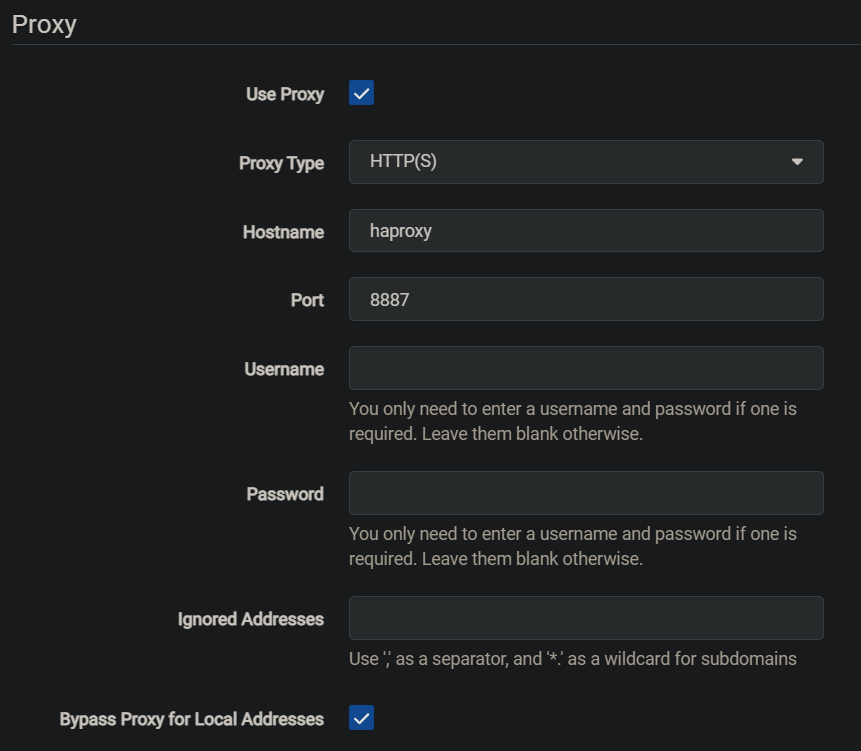
Now you can start routing all your traffic to the HAProxy port. For Sonarr this could look like this:
Once the containers are running, HAProxy will begin distributing traffic across your VPN instances. A few example log lines might look like this:
haproxy | 172.xx.0.xx:42818 [16/Nov/2025:23:28:57] vpn_proxy vpn_servers/gluetun_PerfectPrivacy 1/0/30001 0 --
haproxy | 172.xx.0.xx:38040 [16/Nov/2025:23:29:16] vpn_proxy vpn_servers/gluetun_RapidSeedbox 1/0/11007 56 --
haproxy | 172.xx.0.xx:38044 [16/Nov/2025:23:29:16] vpn_proxy vpn_servers/gluetun_ProtonVPN 1/0/11006 56 --
haproxy | 172.xx.0.xx:45812 [16/Nov/2025:23:29:27] vpn_proxy vpn_servers/gluetun_RapidSeedbox 1/0/67 56 --
And that’s pretty much it. With a handful of Gluetun containers, a light HAProxy config, and a bit of Docker Compose glue, you end up with a flexible multi-VPN setup that can distribute traffic, handle failovers, and work around flaky providers without any manual intervention. It’s simple, effective, and easy to extend if you ever want to add more VPN endpoints or route specific apps through specific providers.
That's all for today. Happy sailing.